Many businesses install chat widgets to reduce support tickets, only to find the bot hallucinates answers or gets stuck in loops. The issue usually isn't the technology itself—it's the approach. Traditional bots rely on keywords or rigid decision trees. They don't understand meaning, only text.
To truly improve discovery and reduce friction, you need a semantic search layer that interprets intent and delivers verified answers. This guide explains how to move beyond basic chatbots and implement an AI solution that actually helps your visitors find what they need.
Why users struggle to find answers on your site
Search is where users go when they are ready to act, yet it is often the most neglected feature. Users don't search in keywords; they search in situations. They type questions like, "how do I fix the sync error?" or "pricing for non-profits."
If your internal search relies on exact keyword matching, it fails to return relevant results unless the user guesses the perfect phrasing. This leads to dead ends, frustration, and a high bounce rate. When users can’t find the answer, they either leave or submit a support ticket—driving up costs for your team.
Understanding the different types of website AI
Before you implement a solution, it helps to distinguish between a traditional chatbot and a semantic search layer.
Rule-based chatbots vs. Semantic search
Traditional rule-based chatbots operate on "if/then" logic. If a user says "X," the bot replies "Y." While functional for simple FAQs, they fail when a user deviates from the script. They can't handle typos, messy phrasing, or complex queries.
In contrast, semantic search understands meaning. It uses natural language processing to interpret the context behind a query. For example, if a user types "retun polcy," a semantic engine understands they mean "return policy" and surfaces the correct page immediately, regardless of the spelling error.
The benefit of answer-first experiences
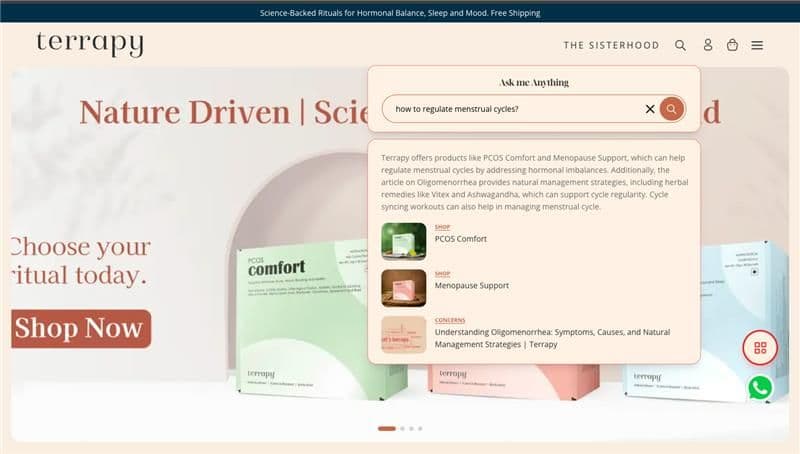
Users want answers, not a conversation. A conversational interface that asks, "How can I help you today?" can be a barrier. An answer-first experience provides the solution immediately, backed by clickable sources. This respects the user's time and builds trust by showing exactly where the information came from. Seekrs utilizes these semantic search capabilities to turn your documentation into a self-serve experience.
How to add an AI bot that understands intent
Implementing an AI layer shouldn't require a massive overhaul of your website. Follow these steps to integrate a solution that prioritizes relevance and speed.
Step 1: Audit your content and knowledge base
AI is only as good as the data it accesses. Before you add an AI bot to your website, audit your content. Identify your high-value pages: documentation, FAQs, pricing pages, and help articles.
Don't index everything blindly. If you surface tag pages, thin content, or duplicate files, users will lose trust. Curate the sources so the AI only pulls from verified, accurate information.
Step 2: Choose a solution that prioritizes sources
Transparency is non-negotiable. Select a tool that displays citations or links next to its answers. If the AI provides a solution, the user should be able to click through to the original article to verify the details.
This "source-backed" approach reduces anxiety and encourages users to explore your site further. It transforms the bot from a black box into a helpful guide.
Step 3: Integrate with minimal disruption
Modern AI layers are designed to plug into existing sites easily. Look for solutions that offer a simple JavaScript snippet or React component. This allows you to integrate with your knowledge base without rebuilding your infrastructure. You can embed the search bar in your hero section, help center, or documentation pages to meet users exactly where they are.
Using AI insights to fix content gaps
An intelligent agent does more than just answer questions; it tells you what you don’t know. By analyzing search queries, you can identify content gaps—questions users are asking that you haven’t answered yet.
For example, a SaaS company might notice users frequently searching for "API rate limits" while their documentation only refers to "request throttling." Another client might find that "invoice export" is a top query simply because the billing page is buried in the settings menu. These insights allow you to fix navigation and create content that addresses actual user demand. Seekrs provides these content intelligence features to help your team make data-driven decisions.
Best practices for trustworthy AI
To ensure your AI layer adds value rather than noise, adhere to these core principles.
Transparency and source verification
Never hide the source of the answer. Users should always see the link to the original page. This builds trust and allows for easy verification. If the AI is unsure, it should admit it rather than hallucinating an answer.
Maintaining a human-in-the-loop option
AI is powerful, but it isn’t perfect. Always provide an easy path to human support. If the search results don’t solve the problem, a clear "Contact Support" button ensures the user can still get help.
Conclusion
Adding an AI layer to your website is about more than automating support; it is about improving discovery. By focusing on semantic understanding, answer-first results, and content intelligence, you can create a self-serve experience that reduces bounce rates and increases conversions.
Ready to see how semantic search can transform your site?
See how Seekrs improves website discovery
Frequently Asked Questions
Do I need to know how to code to add an AI bot? No. Most modern semantic search platforms, including Seekrs, are designed for easy integration. You typically only need to copy and paste a small JavaScript snippet or use a pre-built component to add the search bar to your site.
What is the difference between a chatbot and semantic search? A traditional chatbot relies on pre-written scripts and keyword matching, often requiring the user to navigate a menu of options. Semantic search understands the intent and meaning behind a user’s natural language query, surfacing the most relevant answer or page immediately without requiring a scripted conversation.
How does AI handle user data and privacy? This depends on the specific provider, but tools focused on search generally prioritize query intent over personal identity. Seekrs focuses on analyzing search terms to improve relevance rather than storing personal user data. Always review a vendor's privacy policy to ensure compliance with your standards.
Can AI help reduce support ticket volume? Yes. By deflecting repetitive questions and helping users find answers instantly, an AI layer can significantly reduce the number of tickets your support team receives. This allows your agents to focus on complex, high-value issues that require a human touch.